Permanent Outdoor Lighting Scheduling and Automation
Permanent outdoor lighting schedules can automate when lights turn on and off, which colors or white tones appear, which scenes or effects run, which lighting zones change, and when the system returns to its normal everyday appearance. Instead of adjusting permanent lighting manually each evening or before every occasion, users can program recurring routines and date-specific changes in advance.
BlueHopper supports dawn-dusk, daily, weekly, yearly, and calendar-based scheduling. Schedules can control colors, white light, effects, presets, scenes, and selected lighting areas, allowing one permanent system to follow everyday routines while also adapting automatically to holidays, events, and seasonal changes.
Turn Lights On and Off Automatically
The most basic automation is deciding when permanent outdoor lighting should begin and end each day.
A home may turn its everyday architectural lighting on in the evening and off later at night. A restaurant may activate exterior lighting before dinner service, while a commercial property may keep selected areas illuminated only during operating hours.
Because the timing is stored as part of the lighting routine, users do not need to remember to switch the system on and off every day.
Let Lighting Follow Dusk and Dawn
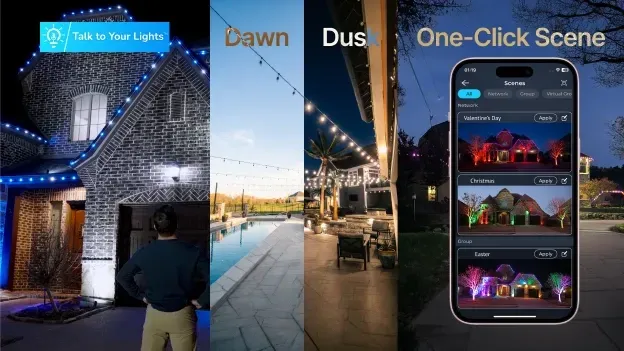
Fixed clock times are not always ideal because sunset changes throughout the year. Dawn-dusk scheduling allows lighting to respond to the natural daylight cycle instead.
Instead of programming the lights for 6:00 PM throughout the year, BlueHopper can activate lighting around dusk and change its operation as seasonal daylight changes. That makes the schedule more useful for everyday roofline, landscape, entrance, and architectural lighting.
A property can therefore maintain a consistent relationship with nightfall without repeatedly updating the schedule as days become longer or shorter.
Build Recurring Daily and Weekly Lighting Routines
Schedules can automate routines that repeat on particular days rather than applying the same behavior every night.
Weekday lighting might follow one pattern while Friday and Saturday evenings use another. A business could keep its normal architectural lighting during the week and automatically activate a different scene during weekend operating hours. A homeowner might use one evening routine during weekdays and another when outdoor spaces are used later.
BlueHopper supports daily and weekly scheduling, so these recurring patterns can remain active without being rebuilt each week.
Schedule Colors, Scenes, and Effects Instead of Only Power
Permanent outdoor lighting schedules can automate the appearance of the lights, not just whether they are on or off.
A schedule can activate a warm-white everyday scene at dusk, change selected areas to another color later in the evening, or run a saved effect for a planned event. Because BlueHopper schedules can use colors, white tones, presets, effects, and scenes, automation can control the visual state of the system as well as its operating time.
This is what separates a programmable permanent lighting system from a conventional outdoor timer.
Prepare Holiday and Event Lighting in Advance
Calendar-based scheduling allows holiday and event lighting to be programmed before the occasion arrives.
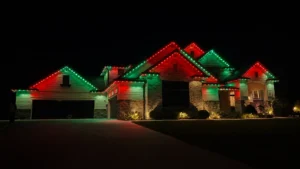
Christmas lighting can begin on a selected date, a red-white-and-blue scene can be prepared for Independence Day, or a business can schedule a promotional scene for a future event. BlueHopper also supports year-round and calendar-based scheduling, allowing recurring or date-specific lighting changes to be planned ahead rather than activated manually on the day.
The system can therefore be prepared weeks or months before an event and still operate automatically when the scheduled date arrives.
Different Lighting Zones Can Follow Different Schedules
A permanent lighting system does not need one schedule for the entire property.
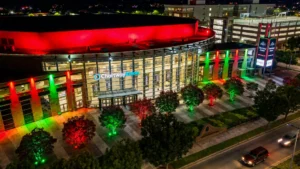
The roofline may turn on at dusk while a patio activates later. Landscape lighting may stay warm white every evening while a front façade changes for an event. A commercial property may schedule its entrance and signage areas differently from landscape or decorative zones.
BlueHopper allows schedules to be assigned to selected lighting groups or ports, so individual areas can follow their own routines while remaining part of the same overall system.
This becomes increasingly useful as a permanent installation expands beyond a single roofline into landscape, fence, patio, architectural, or commercial lighting.
Lighting Can Change Several Times During the Same Evening
Automation can create a sequence of lighting states instead of one setting that remains active all night.
A property might begin with a brighter arrival scene at dusk, transition to a softer everyday look later in the evening, and then turn selected areas off overnight. A restaurant could begin with normal brand lighting, switch to an event scene at a scheduled time, and return to its usual exterior appearance afterward.
Using multiple scheduled changes creates a lighting routine that follows how the property is actually used throughout the evening.
Schedules Can Return the Property to Its Normal Look Automatically
One of the most useful parts of automation is what happens after a holiday, event, or temporary scene ends.
Instead of relying on someone to remember to restore the everyday lighting, another scheduled action can bring the system back to its normal colors, whites, brightness, or scene. A holiday display can therefore run for a defined period and then give way automatically to the property’s usual architectural lighting.
With BlueHopper, the permanent installation stays exactly where it is while scheduling determines what that installation should display at different times.
Scheduling Turns Permanent Lighting Into a Year-Round Routine
The main value of scheduling is that permanent outdoor lighting can behave differently throughout the day, week, season, and year without requiring repeated manual changes.
Everyday lighting can follow dusk automatically. Weekend routines can differ from weekdays. Holiday colors can appear on scheduled dates. Individual zones can follow their own timing, and temporary scenes can automatically return to the normal setting when they end.
BlueHopper therefore uses scheduling not simply as an on/off timer, but as a control layer that determines when each part of the permanent lighting system should operate and what it should display when that time arrives.